
AZ-104 earns Microsoft Certified: Azure Administrator Associate and it was not touched by the 2026 retirements. The current outline is dated April 17, 2026. Five skill areas: identity and governance (20 to 25%), storage (15 to 20%), compute (20 to 25%), networking (15 to 20%), monitoring and backup (10 to 15%). It tests whether you can run an Azure estate, not whether you can recite service names. Pass mark is 700. If you only take one Azure exam in 2027, take this one.
This page is the lookup sheet: weights, the commands, the comparisons that decide most questions, and a lab for each area. Keep the official AZ-104 study guide open beside it, because Microsoft revises the outline.
📋 The exam at a glance
| Detail | What to know |
|---|---|
| Exam | AZ-104: Microsoft Azure Administrator |
| Certification | Microsoft Certified: Azure Administrator Associate |
| Level | Associate (intermediate) |
| Formal prerequisites | None. AZ-900 knowledge helps |
| Passing score | 700 out of 1,000 |
| Length | Associate exams run 100 minutes, or 120 if the exam has labs. Check exam duration and experience |
| Questions | Most Microsoft exams have 40 to 60. Single and multiple choice, drag and drop, case studies, and yes/no sets you cannot revisit |
| Microsoft Learn in the exam | Yes, but the clock keeps running |
| Practice assessment | Free on Microsoft Learn |
| Renewal | Free online assessment every year |
| Price | Varies by region. See the certification page |
Try the exam sandbox once before booking so the interface is not new on the day.
⚖️ Skill areas and weights
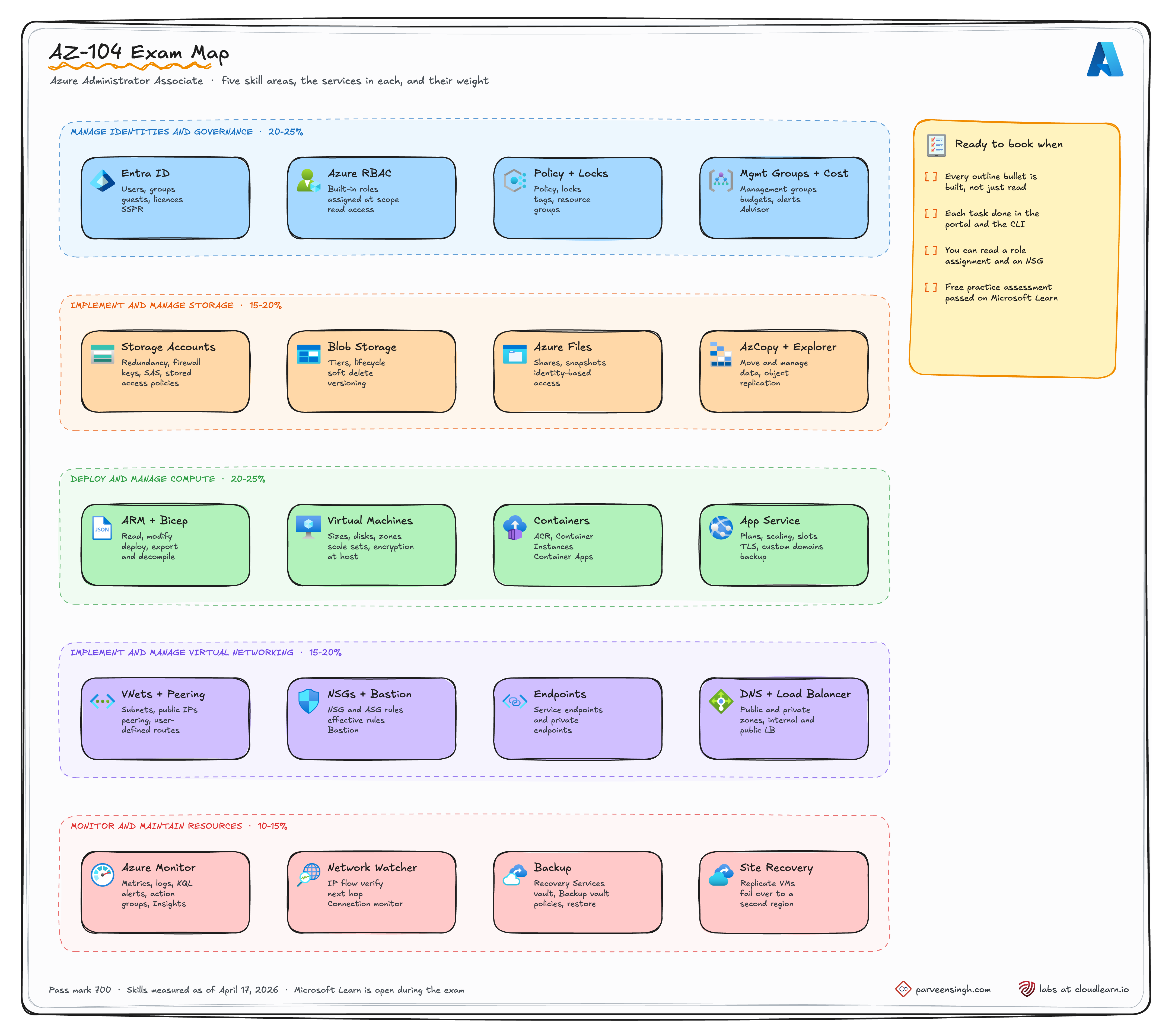
Weights from the official study guide, skills measured as of April 17, 2026.
| Skill area | Weight | What sits inside |
|---|---|---|
| Manage Azure identities and governance | 20 to 25% | Entra users, groups, licences, guests, SSPR. RBAC at scope. Policy, locks, tags, management groups, budgets, Advisor |
| Implement and manage storage | 15 to 20% | Storage firewall, SAS, stored access policies, keys, Azure Files identity. Redundancy, replication, encryption, AzCopy. Tiers, soft delete, lifecycle, versioning |
| Deploy and manage Azure compute resources | 20 to 25% | ARM and Bicep (read, edit, deploy, export). VMs, disks, sizes, zones, scale sets, encryption at host. ACR, ACI, Container Apps. App Service plans, slots, TLS, custom domains, backup |
| Implement and manage virtual networking | 15 to 20% | VNets, subnets, peering, public IPs, UDRs. NSGs, ASGs, Bastion, service and private endpoints. Azure DNS, load balancers |
| Monitor and maintain Azure resources | 10 to 15% | Metrics, logs, KQL, alerts, action groups, Insights, Network Watcher. Recovery Services vault, Backup vault, Site Recovery failover |
Identity and compute are the two heavy areas. Compute is also the widest, because it covers four different hosting models plus templates.
🪪 Identity and governance (20 to 25%)
| Topic | The one thing to know |
|---|---|
| Entra users and groups | Assigned groups have members you add. Dynamic groups fill themselves from a rule on user properties |
| External users | Guests come in through B2B invitation and show as user type Guest |
| SSPR | Enabled per group or for all users, with a number of required methods. Test it with a real user, not your admin account |
| RBAC | Role + principal + scope. Assignments inherit down: management group, subscription, resource group, resource |
| Built-in roles | Owner manages access. Contributor manages everything except access. Reader reads. User Access Administrator manages access only |
| Azure Policy | Controls what resources can look like. RBAC controls who can act. Different questions, different tools |
| Locks | CanNotDelete blocks deletes. ReadOnly blocks deletes and changes. Locks apply to Owners too |
| Tags | Not inherited from the resource group. Use a policy such as "Inherit a tag from the resource group" to copy them down |
| Management groups | Group subscriptions so one policy or role assignment covers all of them |
| Budgets | Send alerts at thresholds. They do not stop spending |
# Give a group Contributor on one resource group
az role assignment create \
  --assignee <group-object-id> \
  --role "Contributor" \
  --scope /subscriptions/<sub-id>/resourceGroups/rg-app

# See everything a user can do, including inherited assignments
az role assignment list --assignee user@contoso.com --all --include-inherited -o table

# Protect a resource group from deletion
az lock create --name no-delete --resource-group rg-app --lock-type CanNotDelete

# Assign a built-in policy at resource group scope
az policy assignment create \
  --name allowed-locations \
  --policy <policy-definition-id> \
  --resource-group rg-app \
  --params '{"listOfAllowedLocations":{"value":["canadacentral"]}}'

# Merge a tag onto an existing resource without wiping its other tags
az tag update --resource-id <resource-id> --operation Merge --tags env=prod"Interpret access assignments" means reading a role assignment list and saying what a user can and cannot do at a given scope. Practise reading the output of the second command above until it is quick.
🗄️ Storage (15 to 20%)
| Topic | The one thing to know |
|---|---|
| Redundancy | LRS: three copies in one datacentre. ZRS: across three zones. GRS: LRS plus a copy in the paired region. GZRS: ZRS plus the paired region. RA- adds read access to the secondary |
| Access tiers | Hot, Cool, Cold, Archive. Early-deletion minimums are 30, 90 and 180 days for Cool, Cold and Archive. Archive is offline until rehydrated |
| Lifecycle management | Rules that move blobs between tiers or delete them by age |
| Object replication | Copies blobs between accounts. Needs blob versioning on both accounts and the change feed on the source |
| Soft delete | Separate settings for blobs, containers and file shares, each with its own retention days |
| Storage firewall | Set the default action to Deny, then allow specific subnets or IPs |
| Azure Files identity | SMB access with AD DS, Entra Domain Services or Entra Kerberos instead of the account key |
| AzCopy and Storage Explorer | AzCopy for scripted bulk copies, Storage Explorer for browsing and one-off moves |
The SAS question, three ways
| SAS type | Signed with | How to revoke it |
|---|---|---|
| Ad hoc account or service SAS | Account key | Rotate the key. That breaks every SAS signed with it |
| SAS tied to a stored access policy | Account key, plus a policy on the container | Change or delete the policy. Only SAS linked to it stop working |
| User delegation SAS | Entra ID credentials | Revoke the user delegation keys, or remove the user's role |
# Create a zone-redundant account, then lock its network to one subnet
az storage account create -g rg-data -n stdata104 -l canadacentral \
  --sku Standard_ZRS --kind StorageV2 --min-tls-version TLS1_2
az storage account update -g rg-data -n stdata104 --default-action Deny
az storage account network-rule add -g rg-data --account-name stdata104 \
  --vnet-name vnet-hub --subnet snet-app

# Stored access policy, then a SAS that points at it
az storage container policy create --account-name stdata104 \
  --container-name reports --name read-30d --permissions rl --expiry 2026-12-31T00:00Z
az storage container generate-sas --account-name stdata104 \
  --name reports --policy-name read-30d -o tsv

# Copy a local folder into a container
azcopy copy "./exports" "https://stdata104.blob.core.windows.net/reports?<sas>" --recursive
A container holds at most five stored access policies. If a question asks how to revoke one partner's access without touching anyone else's, the answer is almost always a stored access policy.
🖥️ Compute (20 to 25%)
| Topic | The one thing to know |
|---|---|
| ARM and Bicep | You must read, edit and deploy both. what-if previews changes. You can export a resource group as ARM JSON and decompile it to Bicep |
| VM availability | Availability set: fault and update domains in one datacentre, 99.95% SLA. Availability zones: separate datacentres, 99.99% SLA. You pick one at create time |
| VM sizes | Resizing restarts the VM. If the size is not available on the current cluster, deallocate first |
| Disks | Standard HDD, Standard SSD, Premium SSD, Premium SSD v2, Ultra. Data disks can be added while the VM runs |
| Encryption at host | Encrypts temp disks and caches too. The feature must be registered on the subscription first |
| Moving VMs | Resource group or subscription: az resource move, same region. Another region: Azure Resource Mover |
| Scale sets | Flexible orchestration is the default for new sets. Autoscale on metrics or a schedule |
| ACR | Private image registry. Admin user off, pull with a managed identity |
| ACI vs Container Apps | ACI: one container group, no scaling rules. Container Apps: revisions, ingress and scale rules |
| App Service plan | The plan is the compute and the bill. Several apps can share one plan |
| Deployment slots | Need Standard tier or higher. Swap warms the slot first, and settings marked as slot settings stay put |
# Deploy a Bicep file, preview first
az deployment group what-if -g rg-app --template-file main.bicep --parameters env=dev
az deployment group create  -g rg-app --template-file main.bicep --parameters env=dev

# Export a resource group and convert the JSON to Bicep
az group export -g rg-app > template.json
az bicep decompile --file template.json

# Encryption at host: register once, then create the VM
az feature register --namespace Microsoft.Compute --name EncryptionAtHost
az provider register --namespace Microsoft.Compute
az vm create -g rg-app -n vm-web01 --image Ubuntu2404 --size Standard_D2s_v5 \
  --zone 1 --encryption-at-host true --admin-username azureuser --generate-ssh-keys

# Which sizes can this VM move to without deallocating?
az vm list-vm-resize-options -g rg-app -n vm-web01 -o table

# Swap staging into production
az webapp deployment slot swap -g rg-app -n app-web --slot staging --target-slot production🌐 Networking (15 to 20%)
| Topic | The one thing to know |
|---|---|
| Subnets | Azure reserves five addresses in every subnet. A /29 gives you three usable |
| Peering | Not transitive. A to B and B to C does not give A to C. Use a hub with a firewall or appliance and UDRs, or peer directly |
| Gateway transit | The hub sets --allow-gateway-transit, the spoke sets --use-remote-gateways |
| Public IPs | Standard SKU only now. Basic public IPs retired on September 30, 2025 |
| UDRs | Next hop types: Virtual network gateway, Virtual network, Internet, Virtual appliance, None. The most specific prefix wins |
| NSG rules | Priority 100 to 4096, lowest number first, first match wins. Default rules sit at 65000 and above |
| NSG order | Inbound: subnet NSG then NIC NSG. Outbound: NIC NSG then subnet NSG. Traffic must be allowed by both |
| ASGs | Name groups of NICs, such as web or db, and use them in NSG rules instead of IP addresses |
| Bastion | RDP and SSH from the portal, no public IP on the VM. Lives in a subnet named AzureBastionSubnet |
| Azure DNS | Public zones for internet names. Private zones linked to VNets for internal names |
| Load balancer | Layer 4. Standard SKU is closed by default, so the backend NSG must allow the traffic. Health probe down means no traffic |
Service endpoint or private endpoint
| Service endpoint | Private endpoint | |
|---|---|---|
| What it gives the service | Your subnet's identity, over the Microsoft backbone | A private IP inside your VNet |
| Service still has a public endpoint | Yes, locked to your subnet by the service firewall | Can be disabled entirely |
| Reachable from on-premises or peered VNets | No | Yes |
| DNS work | None | A private DNS zone such as privatelink.blob.core.windows.net |
| Cost | Free | Charged per hour and per GB |
| Pick it when | Simple, same-VNet access and no budget | The service must have no public exposure |
# Peer hub and spoke, both directions
az network vnet peering create -g rg-net -n hub-to-spoke \
  --vnet-name vnet-hub --remote-vnet vnet-spoke --allow-vnet-access --allow-forwarded-traffic
az network vnet peering create -g rg-net -n spoke-to-hub \
  --vnet-name vnet-spoke --remote-vnet vnet-hub --allow-vnet-access --allow-forwarded-traffic

# Send spoke traffic through a firewall appliance
az network route-table route create -g rg-net --route-table-name rt-spoke \
  -n default-to-fw --address-prefix 0.0.0.0/0 \
  --next-hop-type VirtualAppliance --next-hop-ip-address 10.0.1.4

# Troubleshooting: what NSG rules apply, would this packet pass, where does it go
az network nic list-effective-nsg -g rg-app -n vm-web01-nic
az network watcher test-ip-flow -g rg-app --vm vm-web01 \
  --direction Inbound --protocol TCP --local 10.1.0.4:443 --remote 203.0.113.10:50000
az network watcher show-next-hop -g rg-app --vm vm-web01 \
--source-ip 10.1.0.4 --dest-ip 10.2.0.4"Troubleshoot network connectivity" questions usually give you a VM that cannot reach something. Check in this order: effective NSG rules, effective routes, DNS, then the target's own firewall.
📈 Monitoring and backup (10 to 15%)
| Topic | The one thing to know |
|---|---|
| Metrics vs logs | Metrics are numbers over time, kept 93 days. Logs are records you query with KQL in Log Analytics |
| Diagnostic settings | Platform logs are not collected until you add a diagnostic setting that sends them somewhere |
| Activity log | Control-plane events, who did what. Kept 90 days unless you export it |
| Alerts | Alert rule = scope + condition + action group. Alert processing rules suppress or reroute alerts, for example during maintenance |
| Insights | VM, storage and network Insights are prebuilt workbooks. VM Insights needs the Azure Monitor agent and a data collection rule |
| Network Watcher | IP flow verify, next hop, connection troubleshoot, Connection Monitor. Use VNet flow logs. NSG flow logs are being retired |
| Recovery Services vault | VMs, SQL Server and SAP HANA in VMs, Azure Files, MARS agent backups. Also Site Recovery |
| Backup vault | Newer workloads: Azure Blobs, managed disks, Azure Database for PostgreSQL, AKS |
| Site Recovery | Replicate VMs to another region. Test failover into an isolated VNet, failover, commit, then reprotect and fail back |
// Failed control-plane operations in the last day, grouped by who ran them
AzureActivity
| where TimeGenerated > ago(24h)
| where ActivityStatusValue == "Failure"
| summarize Failures = count() by OperationNameValue, Caller
| order by Failures desc
# Turn on backup for a VM with an existing policy
az backup protection enable-for-vm -g rg-backup --vault-name rsv-prod \
--vm vm-web01 --policy-name DefaultPolicyThis area is the smallest, but the questions are concrete. You will be asked which vault, which alert component, or which Network Watcher tool solves a stated problem.
⏭️ What is not in the current outline
These come up in older courses and practice tests. They are not in the April 17, 2026 skills list, so do not spend hours on them.
- AKS cluster administration. Containers are ACR, ACI and Container Apps only
- Custom RBAC roles. The outline says built-in roles
- Azure Disk Encryption with BitLocker or dm-crypt. Encryption at host is the listed skill
- Conditional Access and Privileged Identity Management. That is SC-300
- VPN Gateway, ExpressRoute, Azure Firewall and Application Gateway configuration. That is AZ-700
- Writing Bicep modules from scratch. Read, modify, deploy and export are the listed skills
Related topics can still appear, and an older question bank may test any of these. Spend your hours on the listed bullets first.
🗓️ Study order
One area at a time, the two heavy ones first. For a week-by-week version with the hands-on work spelled out, follow the AZ-104 in 8 Weeks study plan video.
| Order | Area | Done when |
|---|---|---|
| 1 | Identity and governance | You can assign a role at three scopes and explain the effective access |
| 2 | Compute | You have deployed a VM from a Bicep file and swapped an App Service slot |
| 3 | Networking | Two peered VNets, an NSG blocking one port, and you proved it with IP flow verify |
| 4 | Storage | You issued a SAS from a stored access policy and revoked it |
| 5 | Monitoring and backup | An alert fired to your email, and you restored a file from a VM backup |
| 6 | Review | Practice assessment taken, weakest area re-studied, taken again |
Do every task in both the portal and the CLI at least once. The portal is where you learn what the options are. The CLI is where you learn what they are called.
🧪 Where to practise
Microsoft Learn
| Resource | Use it for |
|---|---|
| AZ-104 study guide | The official skills outline. Your checklist |
| Free practice assessment | Official practice questions, at the end |
| Identities and governance path | SSPR, Policy, management groups and budgets |
| Storage path | Storage security and AzCopy |
| Compute path | App Service slots, TLS and backup |
| Virtual networks path | DNS and load balancing |
| Monitor and back up path | Backup, Site Recovery and Network Watcher |
CloudLearn labs
Real Azure environment, guided steps, automatic checks, nothing left running afterwards.
If you only do one lab this week, make it NSGs and ASGs. Rule priority, subnet versus NIC order and effective rules show up across the networking area, and they only click once you have blocked your own traffic.
Implement NSGs and ASGs in Azure
Build NSG rules with application security groups, block and allow real traffic, and read the effective rules in a live Azure environment.
✅ Exam-day checklist
- Every outline bullet ticked, with something built for each
- Practice assessment taken at least once
- Exam sandbox tried
- Time limit per question set, slow ones marked for review
- Marked questions answered before any section you cannot return to
- For online exams: clear desk, everything closed, Pearson VUE rules read the day before
- Booked at the time of day you think best
Where AZ-104 leads next, AZ-305, AZ-700 or SC-500, is in the Azure Certification Roadmap 2027.
