
Don't start with the exam. Start with the Azure foundation, pick one lane that matches the job you have today, build that lane's proof project, and only then book the exam. Identity leads to SC-300, cloud platform security leads to SC-500 and security operations leads to SC-200. Every box below is something you can do and check, so tick it only when you have actually done it.
Work through the blocks in order and pick your lane from the first table before you open a single study guide.
🧭 Which lane fits your current job
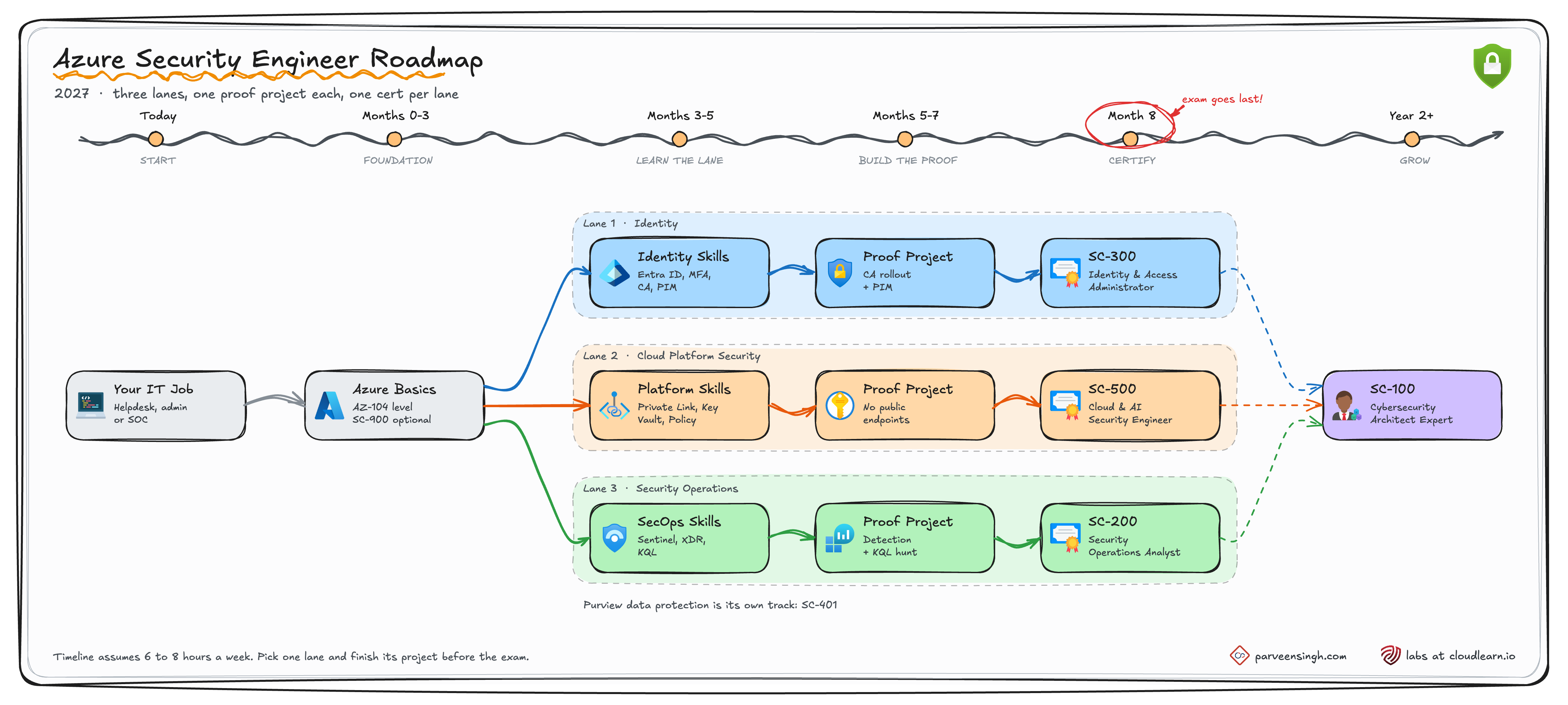
Find your row before you study anything. If two rows fit, pick the one closest to the work you already do every week. You can switch lanes later, because the skills overlap more than the exam numbers suggest.
| If you work as | Your lane | Associate exam | What you will do all day |
|---|---|---|---|
| Helpdesk, Microsoft 365 admin, sysadmin who knows Active Directory | Identity | SC-300 | Entra ID, Conditional Access, MFA and passwordless, PIM, access reviews |
| Azure admin, network engineer, engineer coming from AWS or Google Cloud | Cloud platform security | SC-500 | Segmentation, private endpoints, Key Vault, Azure Policy, Defender for Cloud, AI workloads |
| SOC analyst who wants to move past alert triage | Security operations | SC-200 | Defender XDR, Sentinel, detections, KQL hunting, incident response |
The order of this checklist:
| Block | What it proves | Timing at 6 to 8 hours a week |
|---|---|---|
| 1. Azure foundation | You can run the platform you are about to secure | Months 0 to 3 |
| 2. One lane: skills | You understand the controls in your lane | Months 3 to 5 |
| 3. One lane: proof project | You can build and explain those controls | Months 5 to 7 |
| 4. Exam readiness | The exam confirms what you already built | Month 8 |
| 5. What comes after | Depth, a second lane, or architecture | Year 2 |
🧱 Block 1. The Azure foundation
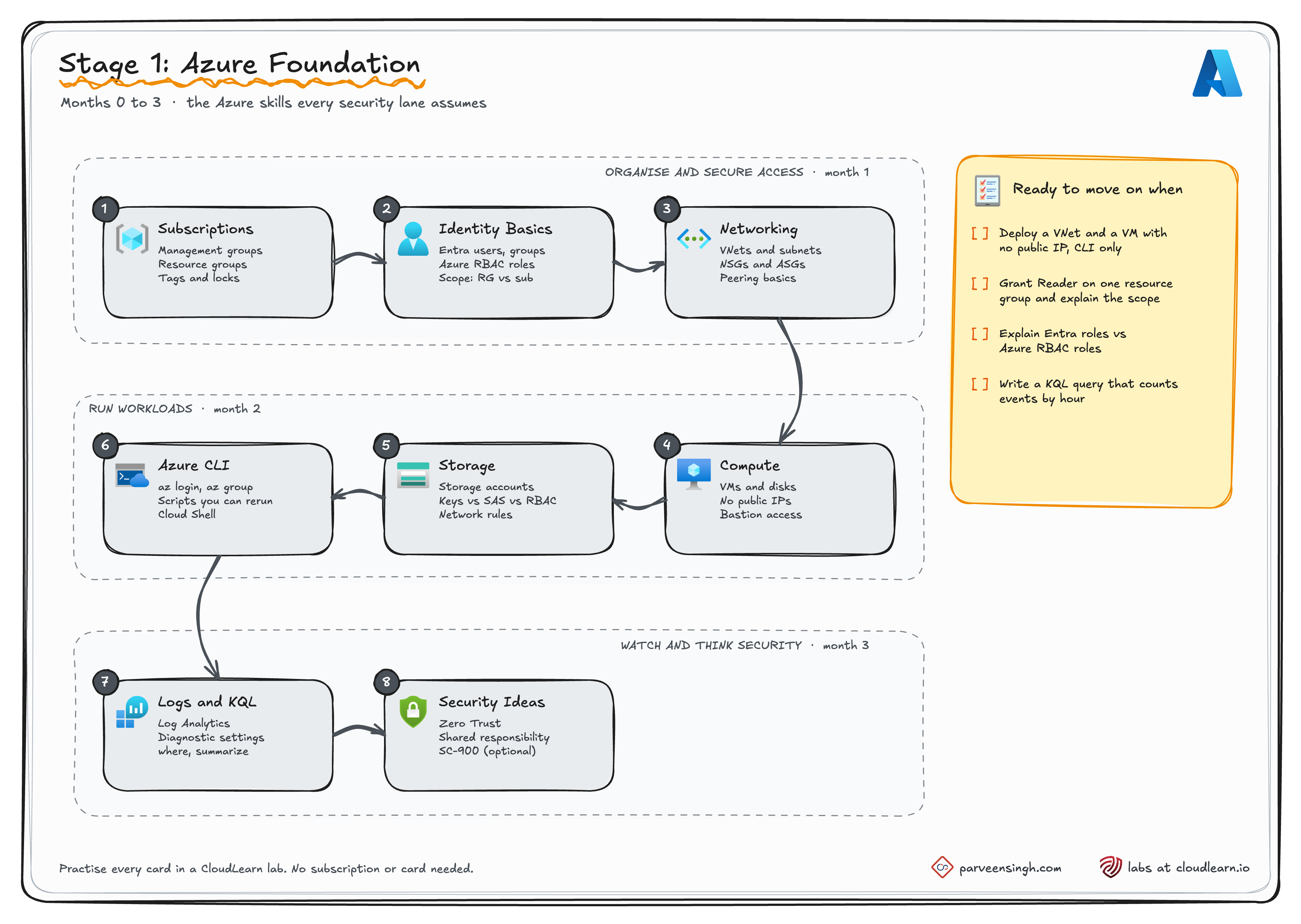
Security engineer is rarely anyone's first cloud job. The SC-500 study guide expects hands-on Azure administration experience, and interviewers will ask you to secure something you have already built. You do not have to pass AZ-104, but you do need the skills it tests.
Can you do this today?
- Sign in to the Azure portal and find a resource group and the resources inside it
- Put a delete lock on a resource group, then try to delete it and read the error
- Create two users and a group in Entra ID, and add the users to the group
- Give one user Reader on a single resource group, and say why you did not use a subscription-level role
- Explain an Entra ID role and an Azure RBAC role in one sentence each
- Create a virtual network with two subnets using only the Azure CLI
- Attach an NSG to a subnet and prove a blocked port is actually blocked
- Deploy a VM with no public IP using only the Azure CLI, then reach it another way
- Create a storage account and say which network access setting it got by default
- Write a KQL query that counts sign-ins or events by hour
The last box is a short one. If this runs against your own workspace, you are ready:
SigninLogs
| where TimeGenerated > ago(7d)
| summarize SignIns = count() by bin(TimeGenerated, 1h)
| order by TimeGenerated asc
Labs that cover this block:
| Lab | Ticks off |
|---|---|
| Creating Your First Virtual Machine (free) | Your first VM |
| Implementing Azure Resource Locks | Locks |
| Entra ID: Create Users, Groups and Assign Roles | Users, groups, RBAC |
| Implement NSGs and ASGs | NSGs |
| Secure VM Access with Azure Bastion | Reaching a VM without a public IP |
| Getting Started with Azure Storage Account | Storage |
| Introduction to KQL in Azure Log Analytics | KQL |
On Microsoft Learn, the AZ-104 prerequisites path and Get started with the Azure CLI cover the same ground. SC-900 is optional.
Start with the free VM lab if you have never deployed anything:
Creating Your First Virtual Machine in Azure
Free. A real Azure environment, guided steps and checks on your work.
🪪 Lane 1. Identity, toward SC-300
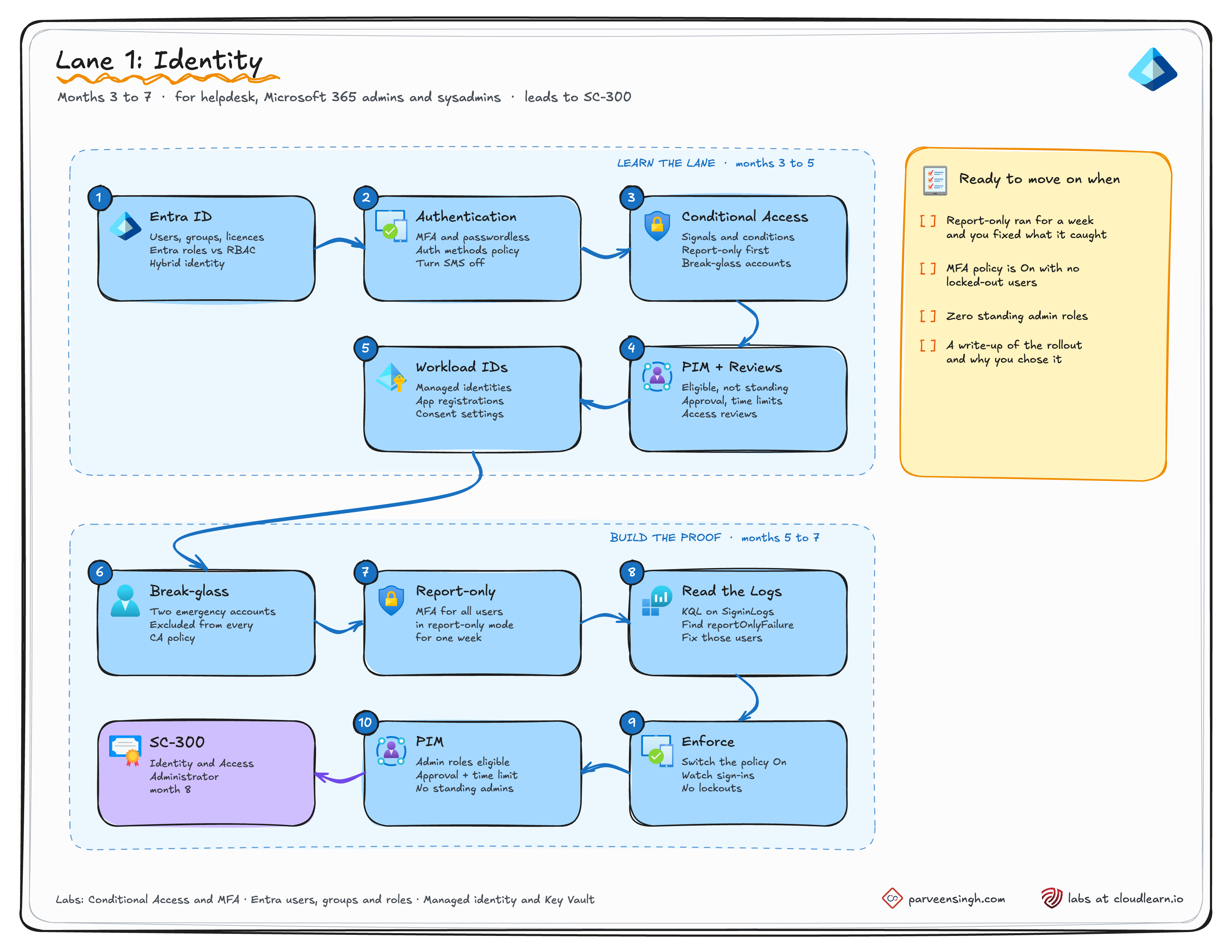
SC-300 weights user identities at 20 to 25%, authentication and access management at 25 to 30%, workload identities at 20 to 25% and identity governance at 20 to 25%.
Skills checklist
- Create a Conditional Access policy in report-only mode before you ever switch one on
- Exclude break-glass accounts from a policy and write down why
- Turn on MFA for every user and passwordless sign-in for admins
- Disable SMS as an authentication method where your tenant allows it
- Make an admin role eligible in PIM, with approval and a time limit, and activate it yourself
- Set up an access review on a group or a role
- Give an app a managed identity so it reads a secret with no stored credential
Proof project: Conditional Access, rolled out safely
- Two break-glass accounts exist and are excluded from every Conditional Access policy
- A policy requiring MFA for all users has run in report-only mode for at least a week
- A KQL query or workbook shows what report-only would have blocked
- Every gap it found is fixed, and the policy is switched to On
- Admin roles are eligible in PIM, not permanently assigned
- A one-page write-up covers what you changed, what report-only caught, and why
The third box is the one interviewers dig into. With sign-in logs in a Log Analytics workspace, this lists what each report-only policy would have done. Rows with reportOnlyFailure are the users to fix first.
SigninLogs
| where TimeGenerated > ago(7d)
| mv-expand Policy = ConditionalAccessPolicies
| where tostring(Policy.result) startswith "reportOnly"
| summarize SignIns = count() by PolicyName = tostring(Policy.displayName), Result = tostring(Policy.result)
Labs for this lane:
| Lab | Ticks off |
|---|---|
| Configure Conditional Access Policies and MFA in Entra ID | Report-only, MFA, switching the policy on |
| Entra ID: Create Users, Groups and Assign Roles | Users, groups, role assignments |
| Securing Azure Web Apps with Managed Identity and Key Vault | Workload identities |
Configure Conditional Access Policies and MFA in Entra ID
The core of the identity proof project, in a real tenant.
🛡️ Lane 2. Cloud platform security, toward SC-500
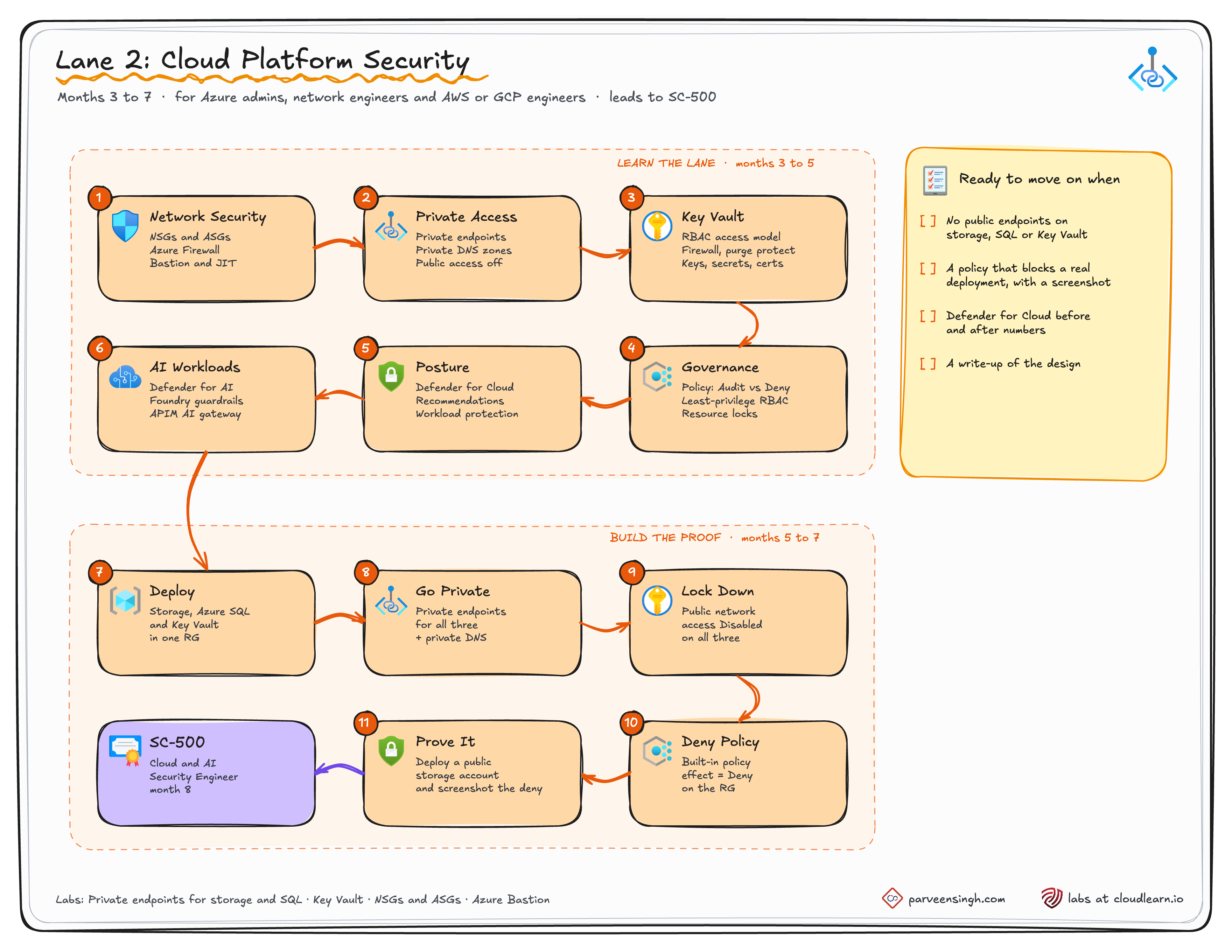
SC-500 weights identity, access and governance at 20 to 25%, storage, databases and networking at 25 to 30%, compute including AI at 20 to 25% and security posture at 20 to 25%.
Skills checklist
- Segment a network with NSGs and application security groups, with no management port open to the internet
- Add a private endpoint and private DNS zone to storage, SQL and Key Vault
- Disable public network access on a PaaS resource and prove it is unreachable from outside
- Run Key Vault with RBAC and have an app read a secret through a managed identity
- Assign an Azure Policy with the Deny effect, not only Audit
- Work a Defender for Cloud recommendation down to healthy
- Explain what Defender for AI services and Foundry guardrails protect
Proof project: one app with no public endpoints
- A storage account, an Azure SQL database and a Key Vault sit in one resource group
- All three have private endpoints with private DNS zones
- Public network access is disabled on all three
- The built-in policy "Storage accounts should disable public network access" is assigned with the Deny effect
- A screenshot shows that policy blocking a real deployment
- Defender for Cloud recommendations are captured before and after
- A one-page write-up explains the design
The policy's default effect is Audit, so set it to Deny, wait a few minutes, then try to break it. The failed deployment is your screenshot.
az policy assignment create \
  --name deny-public-storage \
  --policy b2982f36-99f2-4db5-8eff-283140c09693 \
  --scope "/subscriptions/<subscription-id>/resourceGroups/rg-sec-proof" \
  --params '{ "effect": { "value": "Deny" } }'

# Should fail with RequestDisallowedByPolicy
az storage account create --name stpublictest$RANDOM \
--resource-group rg-sec-proof --public-network-access EnabledLabs for this lane:
| Lab | Ticks off |
|---|---|
| Azure Private Endpoints: Lock Down Your Storage and SQL | Private endpoints, public access off |
| Deploying and Managing Azure Key Vault | Key Vault setup and access |
| Implement NSGs and ASGs in Azure | Segmentation |
| Secure VM Access with Azure Bastion | VM access with no public IP |
Azure Private Endpoints: Lock Down Your Storage and SQL
Two of the three resources in the platform proof project, done for real.
🚨 Lane 3. Security operations, toward SC-200
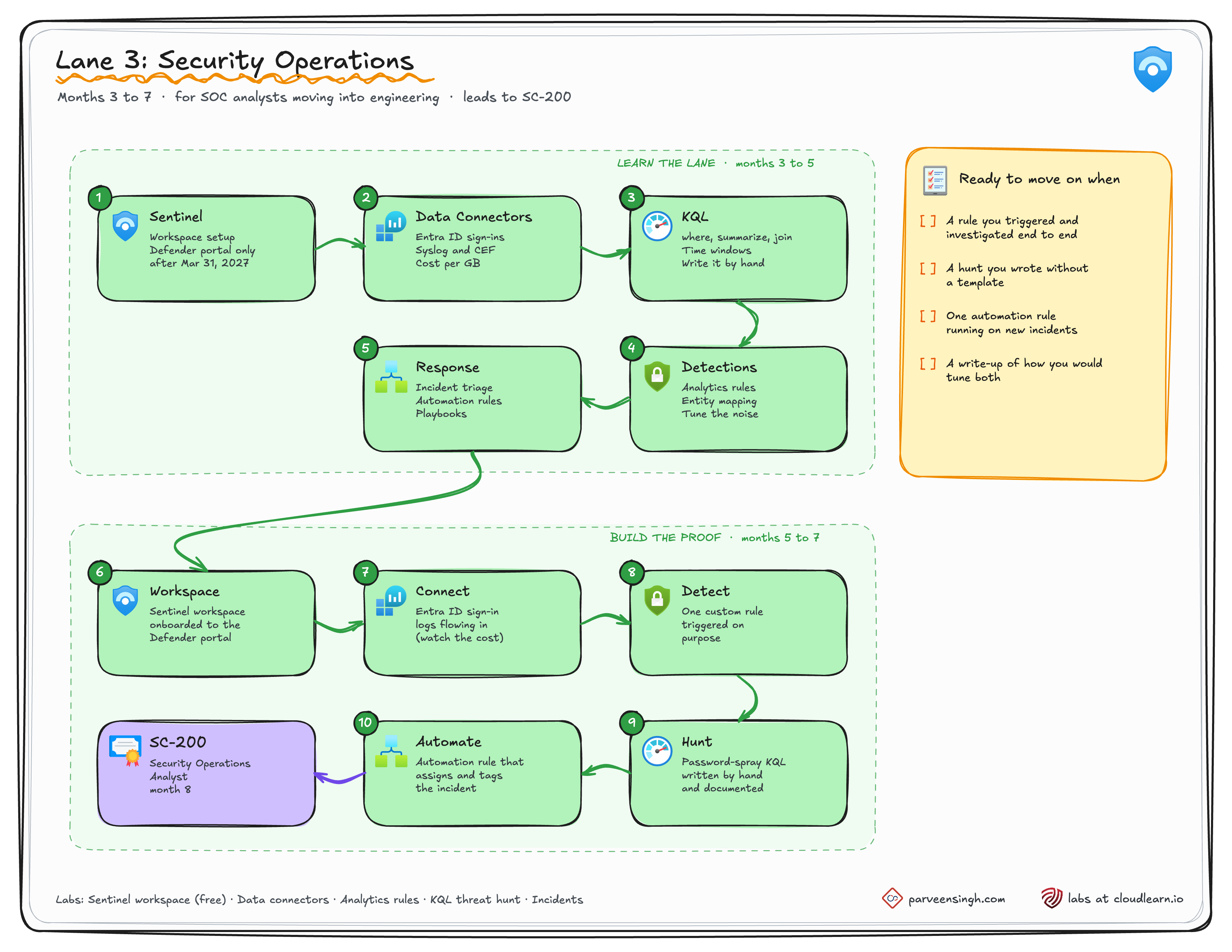
SC-200 weights managing a security operations environment at 40 to 45%, responding to incidents at 35 to 40% and threat hunting at 20 to 25%.
Skills checklist
- Onboard a Sentinel workspace to the Microsoft Defender portal
- Connect a data source and estimate its ingestion cost before you turn it on
- Write a custom analytics rule with entity mapping
- Tune a rule so it stops flooding the incident queue
- Write a KQL hunt from a blank editor, without a template
- Build an automation rule for an incident type you see every week
Proof project: one detection and one hunt
- A Sentinel workspace is onboarded to the Defender portal
- At least one data connector is sending data, such as Entra ID sign-in logs
- One custom analytics rule exists, and you have triggered it on purpose
- One KQL hunt is written by hand and documented, even if it found nothing
- One automation rule assigns and tags the incident
- A one-page write-up covers the rule logic, the hunt, and how you would tune both
A good first hunt is password spraying, which looks like one IP address failing sign-ins against many accounts. Write your own version first, then compare it with this one and with the hunting queries in the content hub.
SigninLogs
| where TimeGenerated > ago(1d)
| where ResultType != "0"
| summarize FailedAccounts = dcount(UserPrincipalName), Attempts = count() by IPAddress
| where FailedAccounts >= 10
Labs for this lane:
| Lab | Ticks off |
|---|---|
| Deploying Your First Microsoft Sentinel Workspace (free) | The workspace |
| Enabling Data Connectors in Microsoft Sentinel | Data connectors |
| Creating Custom Analytics Rules and Investigating Incidents | The custom rule |
| Conduct a Threat Hunt Using KQL | The hunt |
| Investigating and Handling Incidents in Microsoft Sentinel | Automation and response |
The workspace lab is free, which makes this the cheapest lane to start today.
Deploying Your First Microsoft Sentinel Workspace on Azure
Free. Step one of the security operations proof project.
🎯 Block 4. Exam readiness
The exam goes last. By then the scenario questions describe problems you have already hit in your own project.
| Lane | Exam | Study guide | Free practice assessment |
|---|---|---|---|
| Identity | SC-300 | SC-300 study guide | SC-300 practice |
| Cloud platform security | SC-500 | SC-500 study guide | Not available yet |
| Security operations | SC-200 | SC-200 study guide | SC-200 practice |
Book the exam only when every box is ticked:
- Every box in your lane's proof project checklist is ticked
- You went through the study guide line by line and marked each skill green (built it), yellow (seen it) or red (never touched it)
- There are no reds left, only greens and yellows
- You passed the free practice assessment twice in a row, where one exists
- You reviewed every wrong practice answer against the docs, not against a dump site
- You can explain your proof project out loud for ten minutes without notes
Know the format before the day:
| Detail | Associate exams |
|---|---|
| Time | 100 minutes, or 120 if the exam includes labs |
| Questions | Usually 40 to 60 |
| Passing score | 700 |
| Microsoft Learn during the exam | Allowed, but the clock keeps running, so use it for one or two lookups |
The source for that table is Microsoft's exam duration and experience page.
🚀 Block 5. What comes after
One lane, one project and one associate certification is the finish line for this checklist. After that, pick one of these.
| Path | Pick it when | Next step |
|---|---|---|
| Go deeper in your lane | You enjoy the work and want to own it on your team | Extend the project with access reviews, Defender for Cloud regulatory compliance or playbooks |
| Add a second lane | Your team needs it, or you are heading toward architecture | Identity and platform security overlap the most |
| SC-100, Cybersecurity Architect Expert | You design security across teams, not just one workload | SC-100 study guide |
| SC-401, Information Security Administrator | You want to protect data with Microsoft Purview | Information Security Administrator |
Ready for SC-100 when:
- You hold SC-300, SC-200 or SC-500, because SC-100 now needs one of the three
- You have done real work in at least one lane, not only the proof project
Ready for SC-401 when:
- You can explain sensitivity labels, data loss prevention and insider risk in your own words
- You have a reason to work in Microsoft Purview, in your job or in a project
SC-401 is its own track rather than a step after your lane. The Azure Certification Roadmap 2027 has every exam status in one place.
⚠️ Where this goes wrong
| Symptom | What happened | Go back to |
|---|---|---|
| Three certifications, still on the helpdesk | Exams stacked with no project in between | Your lane's proof project |
| The SC-500 questions make no sense | Block 1 was skipped | Block 1 |
| Switching lanes every month | Picked the lane that sounded best, not the one closest to your job | The lane table at the top |
Pick one lane, finish its project, then book the exam. A finished project gives you something specific to talk about in an interview, and another badge does not. Come back and tick boxes as you go, because this page is meant to be worked through, not read once.
