
You want to become an Azure Cloud Engineer but don't know where to start. This roadmap takes you from absolute zero - starting with IT fundamentals and basic system understanding - all the way to landing your first cloud role. Every phase has free Microsoft Learn modules, hands-on labs, and a clear "you're ready to move on when..." checkpoint.
🗺️ How This Roadmap Works
This isn't a list of links to dump into your bookmarks and forget. It's a structured learning path organized into phases, where each phase builds on the last.
Here's the approach:
- 📚 Learn the concept - Microsoft Learn modules (free, official, always current)
- 🧪 Do the lab - Hands-on practice in real Azure environments
- 🏗️ Build something - A mini-project to prove you understood it
- ✅ Checkpoint - How to know you're ready for the next phase
Estimated total time: 6–9 months (2–3 hours/day). Faster if you have IT background. Slower is fine - this isn't a race.
Bookmark this page. Come back to it weekly. Check off phases as you complete them. The people who succeed in cloud aren't the smartest - they're the most consistent.
The 2026 Azure Roadmap in 5 Phases (From Zero to a Hired Specialist)
This roadmap in video form: the phases, the timelines, and the mistakes to skip, in 8 minutes.
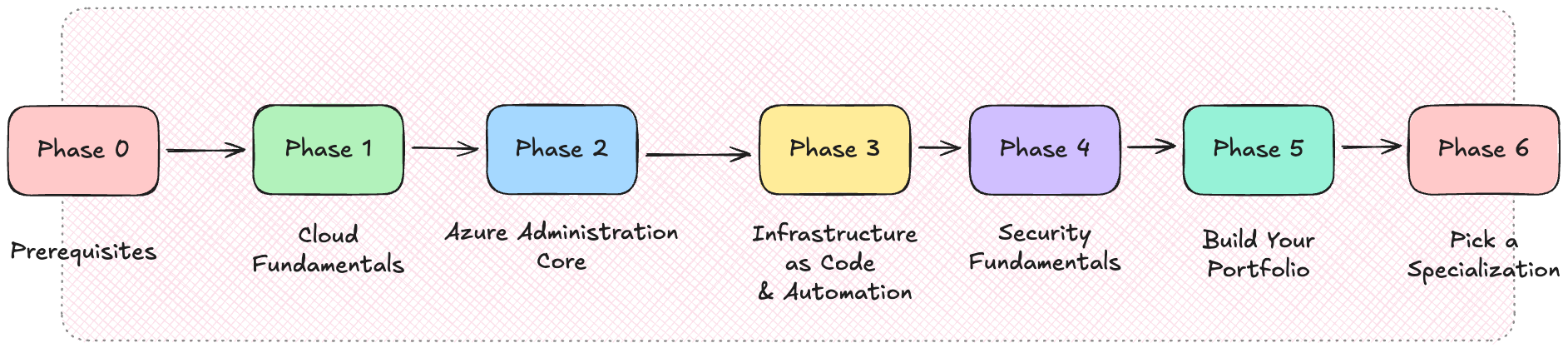
🔧 Phase 0: Prerequisites - Build Your IT Foundation
⏱️ Time: 2–4 weeks
Before you touch Azure, you need basic IT literacy. If you already work in IT support, helpdesk, or system administration, skim this section and move to Phase 1. If you're coming from a completely non-technical background - start here.
🖥️ What You Need to Understand
You don't need a Computer Science degree. You need to understand how computers, networks, and operating systems work at a basic level. Here's exactly what to learn:
| Topic | Why It Matters for Cloud |
|---|---|
| How computers work | Cloud is just someone else's computer - you need to understand CPUs, RAM, storage |
| Operating systems (Windows & Linux basics) | You'll manage VMs running both. Linux is everywhere in cloud |
| Networking fundamentals | IP addresses, DNS, subnets, ports - cloud networking builds on these |
| Command line / terminal basics | Azure CLI, PowerShell, SSH - the cloud runs on command lines |
| Basic security concepts | Passwords, encryption, firewalls - security is job #1 in cloud |
📘 Free Learning Resources
| Resource | What It Covers | Link |
|---|---|---|
| Microsoft Learn: Computer Networking | Networking basics, IP, DNS, ports | learn.microsoft.com |
| Microsoft Learn: Windows Server Fundamentals | OS concepts, Windows administration | learn.microsoft.com |
| Linux Journey | Interactive Linux basics for total beginners | linuxjourney.com |
| Professor Messer: CompTIA A+ Videos | Hardware, OS, networking, security - free playlist | YouTube |
| PowerShell in 30 Days of Lunches | Learn PowerShell from scratch | learn.microsoft.com |
| Networking Fundamentals (Microsoft Learn) | IP addressing, subnets, DNS, DHCP | learn.microsoft.com |
🧪 Hands-On Practice
| What to Do | How |
|---|---|
| Open a terminal | Windows: PowerShell. Mac: Terminal. Run basic commands (cd, ls/dir, mkdir, ping) |
| Set up a Linux VM locally | Download VirtualBox + Ubuntu. Install it. Navigate the file system |
| Practice networking commands | Run ipconfig/ifconfig, ping google.com, nslookup, tracert |
| Use a text editor from CLI | Learn nano or vim basics on your Linux VM |
✅ Phase 0 Checkpoint
You're ready for Phase 1 when you can:
- Explain what an IP address is and what DNS does
- Navigate a file system using the command line (both Windows and Linux)
- Explain the difference between RAM and storage
- Run
pingandnslookupand understand the output - Create a folder, create a file, and edit it - all from the terminal
Don't skip Phase 0. I've seen students struggle with AZ-900 concepts not because cloud is hard, but because they didn't understand what a subnet was before they tried to learn cloud networking. Build the foundation first.
☁️ Phase 1: Cloud Fundamentals - Understand the "Why" Before the "How"
⏱️ Time: 2–4 weeks | 🎯 Goal: Pass AZ-900
This is where you learn cloud vocabulary, understand Azure's structure, and prove it with the AZ-900 certification. Everything from this point forward is Azure-specific.
📘 Microsoft Learn - Official AZ-900 Learning Paths (FREE)
Complete these three learning paths in order. They're designed by Microsoft specifically for AZ-900 prep:
| # | Learning Path | Duration | Link |
|---|---|---|---|
| 1 | Describe cloud concepts | 52 min | learn.microsoft.com |
| 2 | Describe Azure architecture and services | 3 hr 25 min | learn.microsoft.com |
| 3 | Describe Azure management and governance | 1 hr 42 min | learn.microsoft.com |
Total study time: ~6 hours of structured content + practice
🎯 Key Concepts You Must Understand
| Concept | What to Know |
|---|---|
| IaaS, PaaS, SaaS | The three service models - know real examples of each |
| Shared responsibility model | What Microsoft manages vs. what you manage |
| Regions and availability zones | Where Azure resources physically live and why it matters |
| Resource groups | How Azure organizes resources - think of it like folders |
| Azure Resource Manager (ARM) | The control plane that manages everything |
| Subscriptions and management groups | How billing and governance are organized |
| Cost management | How pricing works, budgets, and the pricing calculator |
| Microsoft Entra ID | Identity and access management (formerly Azure AD) |
📺 Free Video Resources
| Resource | Best For | Link |
|---|---|---|
| John Savill's AZ-900 Study Cram | 3-hour video covering everything for the exam | YouTube |
| FreeCodeCamp AZ-900 Course | Full structured course, totally free | YouTube |
| Adam Marczak - Azure for Everyone | Clear, visual explanations | YouTube |
🧪 Hands-On: Get Into Azure Immediately
Don't just read - build from day one:
- Create a free Azure account → azure.microsoft.com/free ($200 credit + 12 months of free services)
- Explore the Azure Portal - Click around. Look at every section in the left sidebar
- Create a resource group - Your first Azure resource
- Deploy a storage account - Upload a file to blob storage
| Lab | Difficulty | Link |
|---|---|---|
| 🧪 Azure Storage Account Basics | Beginner | cloudlearn.io |
✅ Phase 1 Checkpoint
You're ready for Phase 2 when you can:
- Explain cloud computing to a non-technical friend
- Describe the difference between IaaS, PaaS, and SaaS with examples
- Navigate the Azure portal confidently
- Create a resource group and a storage account without a tutorial
- Pass AZ-900 (or score 80%+ on the practice assessment)
AZ-900 costs $99 USD, but Microsoft frequently offers free exam vouchers through their Virtual Training Days. Attend a free training event and get a voucher - I've seen students save hundreds this way.
🏗️ Phase 2: Azure Administration Core - The Skills That Get You Hired
⏱️ Time: 8–12 weeks | 🎯 Goal: Pass AZ-104
This is the big one. AZ-104 (Azure Administrator Associate) is the most important Azure certification for landing your first cloud job. This phase is where you transform from "I know what Azure is" to "I can manage Azure infrastructure."
📘 Microsoft Learn - Official AZ-104 Learning Paths (FREE)
Complete every learning path below. Each one covers a domain tested on the exam:
| # | Learning Path | Duration | Link |
|---|---|---|---|
| 1 | Prerequisites for Azure administrators | 1 hr 3 min | learn.microsoft.com |
| 2 | Manage identities and governance | 4 hr 44 min | learn.microsoft.com |
| 3 | Implement and manage storage | 3 hr 7 min | learn.microsoft.com |
| 4 | Deploy and manage compute resources | 3 hr 33 min | learn.microsoft.com |
| 5 | Configure and manage virtual networks | 4 hr 30 min | learn.microsoft.com |
| 6 | Monitor and back up Azure resources | 53 min | learn.microsoft.com |
Total study time: ~18 hours of structured content + labs
🗂️ AZ-104 Domain Breakdown
The exam tests five core domains. Here's what to focus on and where to practice each:
Domain 1: Identity & Governance (15-20%)
What to learn: Microsoft Entra ID users/groups, RBAC, subscriptions, Azure Policy, resource locks.
| Resource | Link |
|---|---|
| 📘 MS Learn: Manage identities and governance | learn.microsoft.com |
| 🧪 Lab: Azure Resource Locks | cloudlearn.io |
Domain 2: Storage (15-20%)
What to learn: Storage accounts, blob storage, file shares, access tiers, replication, lifecycle management.
| Resource | Link |
|---|---|
| 📘 MS Learn: Implement and manage storage | learn.microsoft.com |
| 🧪 Lab: Storage Account Basics | cloudlearn.io |
| 🧪 Lab: Blob Storage Operations with CLI | cloudlearn.io |
| 🧪 Lab: Storage Replication & Lifecycle | cloudlearn.io |
Domain 3: Compute (20-25%)
What to learn: Virtual machines, VM Scale Sets, App Service, Container Instances, Azure Functions.
| Resource | Link |
|---|---|
| 📘 MS Learn: Deploy and manage compute | learn.microsoft.com |
| 🧪 Lab: Create Your First VM | cloudlearn.io |
| 🧪 Lab: VM Scale Sets | cloudlearn.io |
| 🧪 Lab: Container Instances | cloudlearn.io |
| 🧪 Lab: Container Apps with Docker Hub | cloudlearn.io |
| 🧪 Lab: App Service Web App | cloudlearn.io |
| 🧪 Lab: Azure Functions Core Tools | cloudlearn.io |
Domain 4: Networking (20-25%)
What to learn: Virtual Networks, subnets, NSGs, Azure Bastion, VNet peering, load balancers, DNS, route tables.
| Resource | Link |
|---|---|
| 📘 MS Learn: Configure and manage virtual networks | learn.microsoft.com |
| 🧪 Lab: Create VNets and Subnets | cloudlearn.io |
| 🧪 Lab: VNet Peering | cloudlearn.io |
| 🧪 Lab: NSGs and ASGs | cloudlearn.io |
| 🧪 Lab: Azure Bastion | cloudlearn.io |
| 🧪 Lab: Route Tables & UDR | cloudlearn.io |
| 🧪 Lab: Internal Load Balancer | cloudlearn.io |
Domain 5: Monitoring & Backup (10-15%)
What to learn: Azure Monitor, Log Analytics, alerts, Azure Backup, Recovery Services vault.
| Resource | Link |
|---|---|
| 📘 MS Learn: Monitor and back up resources | learn.microsoft.com |
📺 Video Study Resources
| Resource | Best For | Link |
|---|---|---|
| AZ-104 in 8 Weeks (my study plan) | Week-by-week plan, updated mid-2026 | YouTube |
| John Savill's AZ-104 Study Cram | Comprehensive study review | YouTube |
| Microsoft Practice Assessment | Official free practice questions | learn.microsoft.com |
AZ-104 has hands-on lab questions in the actual exam. You will be given a live Azure portal and asked to perform tasks. If you haven't actually used the Azure portal and CLI extensively, you will fail this exam. There's no way around it - you MUST practice hands-on.
🛠️ Essential Tools to Master During Phase 2
| Tool | What For | Learn Here |
|---|---|---|
| Azure CLI | Managing resources from the command line | cloudlearn.io |
| Azure PowerShell | Scripting and automation (especially for Windows admins) | learn.microsoft.com |
| Azure Cloud Shell | Browser-based CLI - no local install needed | learn.microsoft.com |
| Azure Portal | The web UI - know it inside and out | Practice daily |
Azure CLI Essentials: Managing Azure Resources with Command Line Tools | CloudLearn
Master Azure CLI essentials by managing resource groups, deploying container apps and VMs, and managing resource states in this hands-on lab.
✅ Phase 2 Checkpoint
You're ready for Phase 3 when you can:
- Create a VM with networking, NSG, and public IP from scratch
- Configure VNet peering between two virtual networks
- Set up a storage account with lifecycle management policies
- Deploy an App Service web app and scale it
- Create and assign RBAC roles to users
- Configure Azure Bastion for secure VM access
- Use Azure CLI to manage resources without the portal
- Pass AZ-104 (or score 80%+ on Microsoft practice assessments)
⚙️ Phase 3: Infrastructure as Code & Automation - Think Like an Engineer
⏱️ Time: 4–6 weeks
You can click buttons in the Azure portal. Good. Now stop doing that. Real cloud engineers automate everything. This phase teaches you to define infrastructure as code so deployments are repeatable, version-controlled, and reviewable.
🛠️ Pick Your IaC Tool
| Tool | Best For | Learning Path |
|---|---|---|
| ARM Templates | Native Azure JSON templates - good to understand, painful to write | Start here if you want to understand how Azure works under the hood |
| Bicep | Modern Azure-native IaC - what ARM templates should have been | Recommended if you're going all-in on Azure |
| Terraform | Multi-cloud IaC - most popular in the industry | Recommended if you want the most marketable skill |
Pick one IaC tool and get good at it. Don't try to learn all three at once. If you're unsure, start with Terraform - it's the most widely used in job postings and works across all clouds. Add Bicep later if you specialize in Azure.
📘 Learning Resources
ARM Templates
| Resource | Link |
|---|---|
| 📘 MS Learn: Deploy Azure infrastructure using ARM | learn.microsoft.com |
| 🧪 Lab: Deploy Your First ARM Template | cloudlearn.io |
| 🧪 Lab: Deploy Web App with ARM Template | cloudlearn.io |
Terraform on Azure
| Resource | Link |
|---|---|
| 📘 MS Learn: Terraform on Azure documentation | learn.microsoft.com |
| 📘 HashiCorp Learn: Terraform Tutorials | developer.hashicorp.com |
| 🧪 Lab: Introduction to Terraform on Azure | cloudlearn.io |
| 🧪 Lab: Deploy a Linux VM with Terraform | cloudlearn.io |
| 🧪 Lab: Terraform State with Azure Backend | cloudlearn.io |
| 🧪 Lab: Terraform Modules | cloudlearn.io |
Bicep
| Resource | Link |
|---|---|
| 📘 MS Learn: Fundamentals of Bicep | learn.microsoft.com |
| 📘 MS Learn: Intermediate Bicep | learn.microsoft.com |
🔄 CI/CD and DevOps Basics
You don't need to be a DevOps engineer yet, but you must understand pipelines:
| Resource | Link |
|---|---|
| 📘 MS Learn: GitHub Actions for Azure | learn.microsoft.com |
| 📘 GitHub Docs: Understanding GitHub Actions | docs.github.com |
| 🧪 Lab: GitHub Actions → Azure Container Apps | cloudlearn.io |
✅ Phase 3 Checkpoint
You're ready for Phase 4 when you can:
- Write a Terraform config (or ARM/Bicep template) that deploys a VNet + VM
- Store Terraform state in an Azure Storage backend
- Explain the
init → plan → apply → destroyworkflow - Set up a basic GitHub Actions pipeline that deploys to Azure
- Version control your infrastructure code in Git
🛡️ Phase 4: Security Fundamentals - Because Every Cloud Role Is a Security Role
⏱️ Time: 3–4 weeks
Security isn't optional. Every Azure job posting mentions it. Every interview asks about it. You don't need to become a security specialist, but you must understand how to build secure solutions.
📘 Learning Resources
| Resource | What It Covers | Link |
|---|---|---|
| 📘 MS Learn: Azure Security Fundamentals | Security concepts, Microsoft Defender, Sentinel | learn.microsoft.com |
| 📘 MS Learn: Identity & Access | Microsoft Entra ID, Conditional Access, MFA | learn.microsoft.com |
| 📘 MS Learn: Cybersecurity Concepts | Zero Trust, defense in depth, threat landscape | learn.microsoft.com |
🧪 Hands-On Labs
| Lab | What You'll Learn | Link |
|---|---|---|
| 🧪 Azure Key Vault | Storing and managing secrets securely | cloudlearn.io |
| 🧪 NSGs and ASGs | Network-level traffic control | cloudlearn.io |
| 🧪 Azure Bastion | Secure VM access without public IPs | cloudlearn.io |
| 🧪 VNet Integration for App Service | Private networking for web apps | cloudlearn.io |
| 🧪 Private Endpoint for Web App | Secure private access to PaaS services | cloudlearn.io |
| 🧪 Microsoft Sentinel Workspace | SIEM setup and threat detection | cloudlearn.io |
| 🧪 Sentinel Data Connectors | Ingesting security data | cloudlearn.io |
| 🧪 Sentinel Analytics Rules | Custom threat detection rules | cloudlearn.io |
🔑 Security Concepts to Know
| Concept | Why It Matters |
|---|---|
| Zero Trust | "Never trust, always verify" - the modern security model |
| Conditional Access | Rules that control WHO can access WHAT from WHERE |
| RBAC | Role-Based Access Control - principle of least privilege |
| Private Endpoints | Keep Azure services off the public internet |
| Microsoft Defender for Cloud | Continuous security assessment and recommendations |
| Key Vault | Never hardcode secrets - store them here |
| Network Security Groups | Firewall rules for your virtual networks |
✅ Phase 4 Checkpoint
- Configure Key Vault and retrieve a secret programmatically
- Set up NSG rules to restrict traffic between subnets
- Explain Zero Trust and how it applies to Azure
- Deploy a resource with a private endpoint
- Optionally: Pass SC-900 for foundational security validation
🏗️ Phase 5: Build Your Portfolio - Projects That Prove Your Skills
⏱️ Time: 3–4 weeks
Certifications get you interviews. Projects get you hired. Build 2–3 of these and put them on your resume with GitHub links.
🚀 Recommended Projects (In Order)
| # | Project | Services Used | What It Proves |
|---|---|---|---|
| 1 | Cloud Resume Website | Static Web Apps, Functions, Cosmos DB, GitHub Actions | Full-stack serverless + CI/CD |
| 2 | Serverless Contact Form | Storage, Functions, Table Storage | API design + serverless architecture |
| 3 | Automated VM Deployment | Terraform/Bicep, VNets, NSGs, VMs | Infrastructure as Code |
| 4 | Multi-Tier App with Monitoring | App Service, Key Vault, Azure Monitor, Alerts | Production-ready thinking |
🧪 Guided Labs for Portfolio Projects
| Lab | Skills Demonstrated | Link |
|---|---|---|
| 🧪 Serverless Contact Form | Storage, Functions, end-to-end serverless | cloudlearn.io |
| 🧪 Cosmos DB for Cloud Apps | NoSQL databases, data modeling | cloudlearn.io |
| 🧪 Azure Automation Runbooks | Scripting and automation | cloudlearn.io |
| 🧪 API Management Service | API gateway, rate limiting | cloudlearn.io |
For each project, create a GitHub repository with a clear README that explains: what you built, what Azure services you used, what you learned, and what you'd do differently. This IS your portfolio. Hiring managers read READMEs.
Hands-On Cloud Labs | CloudLearn
150+ hands-on labs in real AWS & Azure environments. Step-by-step guidance with automatic verification. No simulations, real infrastructure.
🧭 Phase 6: Pick Your Specialization - Where Do You Go from Here?
⏱️ Time: Ongoing
You now have the foundation. From here, you choose a specialization based on what you enjoyed most during Phases 1–5.
🗺️ Career Paths from AZ-104
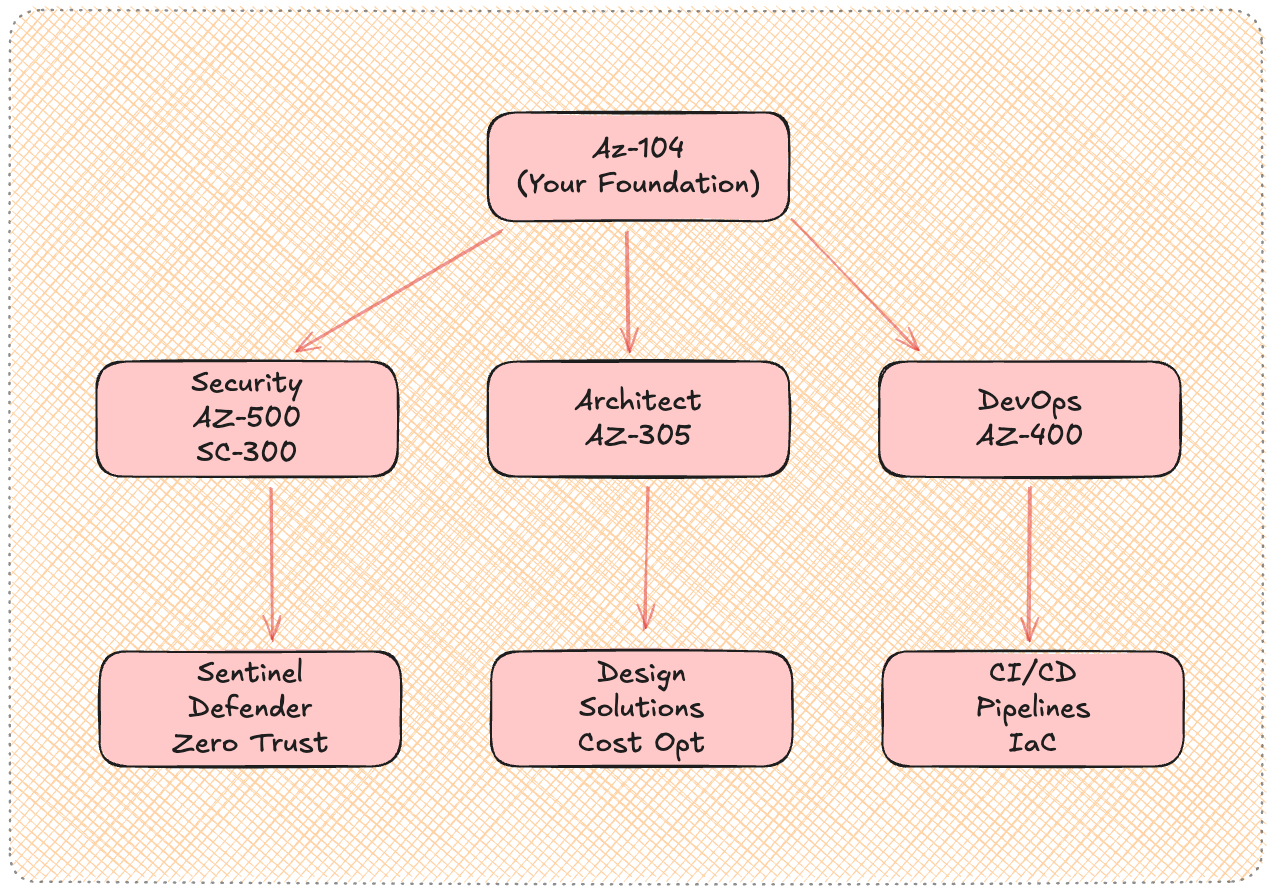
Which Path is Right for You?
| If You Enjoyed... | Go This Direction | Next Cert | Salary Range |
|---|---|---|---|
| 🛡️ NSGs, Key Vault, RBAC, access control | Azure Security Engineer | AZ-500, SC-300 | $110K–$160K |
| 🏛️ Designing architectures, making trade-offs | Azure Solutions Architect | AZ-305 (need 1+ year experience) | $130K–$180K |
| ⚙️ Automation, pipelines, IaC, scripting | Azure DevOps Engineer | AZ-400 | $120K–$170K |
| 🌐 VNets, peering, ExpressRoute, firewalls | Azure Network Engineer | AZ-700 | $115K–$155K |
| 🤖 AI services, OpenAI, cognitive APIs | Azure AI Engineer | AI-102 | $125K–$175K |
| 🖥️ Virtual desktops, remote access, AVD | Azure AVD Specialist | AZ-140 | $105K–$145K |
| 📊 Data pipelines, SQL, analytics | Azure Data Engineer | DP-203 | $120K–$165K |
🤖 Bonus: Azure AI Track (If You Want to Add AI Skills)
AI on Azure is growing fast. After your core foundation, consider exploring:
| Resource | What It Covers | Link |
|---|---|---|
| 📘 MS Learn: Azure AI Fundamentals | AI concepts, Azure AI services | learn.microsoft.com |
| 🧪 Lab: Azure AI Vision Studio | Computer vision, image analysis | cloudlearn.io |
| 🧪 Lab: Azure AI Language Sentiment | NLP, sentiment analysis | cloudlearn.io |
| 🧪 Lab: Azure AI Speech Service | Speech-to-text, text-to-speech | cloudlearn.io |
| 🧪 Lab: Azure AI Translator | Multilingual translation | cloudlearn.io |
| 🧪 Lab: Azure AI OCR | Text extraction from images | cloudlearn.io |
| 🧪 Lab: Azure AI Document Intelligence | Automated document processing | cloudlearn.io |
| 🧪 Lab: Azure AI Search Index | Building search solutions | cloudlearn.io |
| 🧪 Lab: ChatGPT Clone with Azure OpenAI | Build an AI chat application | cloudlearn.io |
🖥️ Bonus: Azure Virtual Desktop Track
| Resource | What It Covers | Link |
|---|---|---|
| 🧪 Lab: Create Your First AVD Solution | Host pools, app groups, workspaces | cloudlearn.io |
| 🧪 Lab: Deploy AVD Session Hosts | Session host configuration | cloudlearn.io |
| 🧪 Lab: Configure and Access AVD | End-to-end AVD access | cloudlearn.io |
📋 The Complete Resource Library
Everything in one place. Bookmark this section.
🆓 Free Learning Platforms
| Platform | What It Offers | Link |
|---|---|---|
| Microsoft Learn | Official learning paths, modules, sandboxes | learn.microsoft.com |
| Azure Free Account | $200 credit + 12 months free services | azure.microsoft.com/free |
| Microsoft Practice Assessments | Official practice exam questions | learn.microsoft.com |
| Azure Architecture Center | Reference architectures and best practices | learn.microsoft.com |
| Azure Pricing Calculator | Estimate costs before you deploy | azure.microsoft.com |
| Azure Updates | Stay current on new services and features | azure.microsoft.com/updates |
🧪 Hands-On Lab Platforms
| Platform | What It Offers | Link |
|---|---|---|
| CloudLearn | Real Azure/AWS environments, guided labs, skill tracking | cloudlearn.io |
| Microsoft Learn Sandbox | Free sandboxes within Microsoft Learn modules | Included in Microsoft Learn |
| Azure Free Account | Your own sandbox - $200 credit to practice | azure.microsoft.com/free |
📺 YouTube Channels Worth Subscribing To
| Channel | Best For | Link |
|---|---|---|
| Parveen Singh (cloudwithsingh) | This roadmap in video form - honest career roadmaps, AZ-104 study plans, Bicep from scratch | YouTube |
| John Savill | Deep technical walkthroughs, study crams, whiteboard sessions | YouTube |
| Adam Marczak | Visual Azure explanations, beginner-friendly | YouTube |
| FreeCodeCamp | Full-length free certification courses | YouTube |
| CloudLearn | Hands-on lab walkthroughs, career advice | YouTube |
| Azure Friday | Official Microsoft channel - short focused episodes | YouTube |
📖 Documentation You'll Reference Daily
| Resource | When to Use It | Link |
|---|---|---|
| Azure CLI Reference | Every CLI command with examples | learn.microsoft.com |
| Azure PowerShell Docs | PowerShell cmdlets for Azure | learn.microsoft.com |
| Terraform Azure Provider | All Terraform resources for Azure | registry.terraform.io |
| Azure Well-Architected Framework | Design principles for production workloads | learn.microsoft.com |
| AZ-900 Study Guide | Official exam skills outline | learn.microsoft.com |
| AZ-104 Study Guide | Official exam skills outline | learn.microsoft.com |
📅 The 6-Month Plan - Week by Week
If you have 2–3 hours per day, here's a realistic timeline:
| Weeks | Phase | What You're Doing |
|---|---|---|
| 1–3 | Phase 0 | IT fundamentals: networking, Linux basics, CLI comfort |
| 4–6 | Phase 1 | Cloud fundamentals, AZ-900 prep, first Azure resources |
| 7 | 🎯 Milestone | Pass AZ-900 |
| 8–12 | Phase 2A | AZ-104 Identity, Storage, Compute |
| 13–17 | Phase 2B | AZ-104 Networking, Monitoring, full practice exams |
| 18 | 🎯 Milestone | Pass AZ-104 |
| 19–22 | Phase 3 | IaC (Terraform or Bicep), CI/CD basics |
| 23–25 | Phase 4 | Security fundamentals, Key Vault, NSGs, Sentinel intro |
| 26–28 | Phase 5 | Build 2–3 portfolio projects, polish GitHub profile |
| 29+ | Phase 6 | Pick specialization, start applying for jobs |
This timeline assumes consistent daily effort. Life happens - if you need to stretch it to 9 or 12 months, that's completely fine. What kills progress is stopping for 3 weeks and having to re-learn everything. Even 30 minutes a day keeps the momentum going.
💼 Getting Your First Cloud Job
📄 What Your Resume Should Show
| Section | What to Include |
|---|---|
| Certifications | AZ-900, AZ-104 (minimum for entry-level roles) |
| Projects | 2–3 Azure projects with GitHub links |
| Skills | Azure (list specific services), Terraform/Bicep, Git, CLI, PowerShell |
| Keywords | Match the job posting - use the same language they use |
🔍 Job Titles to Search For
| Job Title | Experience Level |
|---|---|
| Cloud Support Engineer | Entry-level |
| Junior Cloud Administrator | Entry-level |
| Azure Administrator | 1–2 years |
| Cloud Infrastructure Engineer | 1–2 years |
| Cloud Engineer | 2+ years |
| DevOps Engineer (Azure) | 2+ years |
🎤 Interview Prep
| Question Type | How to Prepare |
|---|---|
| "What is..." knowledge questions | Review AZ-104 study material |
| "Tell me about a time..." behavioral | Prepare stories from your portfolio projects |
| "How would you design..." architecture | Study Azure Architecture Center patterns |
| "What happens when..." scenario questions | Practice with real Azure services - break things and fix them |
| Whiteboard / diagram questions | Practice drawing architectures on paper |
For every project you build, prepare a 60-second story: what you built, what Azure services you used, what went wrong, how you fixed it. Hiring managers want to hear about your problem-solving process, not just the happy path.
🔁 Stay Current - Cloud Never Stops
| Activity | Frequency | Why |
|---|---|---|
| Read Azure Updates | Weekly | Know what's new and what's retiring |
| Build something small | Monthly | Keep your skills sharp |
| Renew certifications | Before expiry | Microsoft certs require renewal - do the free assessment |
| Join the Azure community on Reddit | Ongoing | Real problems from real engineers |
| Follow Azure on Twitter/X | Ongoing | Announcements and previews |
| Attend Microsoft Ignite or Build | Annually | Free virtual attendance, biggest Azure announcements |
The path from zero to Azure Cloud Engineer is clear. It's not easy, but it's not mysterious. Follow the phases, do the labs, build the projects, and stay consistent. Every expert started exactly where you are right now. ☁️
CloudLearn - Hands-On AWS, Azure & Kubernetes Training
Hands-on AWS, Azure, Kubernetes & Docker labs with real-time skill verification. Close skill gaps, track progress, and prove training ROI to leadership.
